

You are currently on the United States site.
Select a location to view location-specific content and shop online.
Razer Blade 18 - New Gaming AI Laptop
Razer Blade 18 2026 KV
Compare Razer Blade 18 Models
|
Razer Blade 18 (2026) |
Razer Blade 18 (2025) |
|---|---|

|

|
| Buy | Learn More Buy |
|
Operating System Windows 11 Home |
Operating System Windows 11 Home |
|
Graphics Processing Unit (GPU)
|
Graphics Processing Unit (GPU)
|
|
Central Processing Unit (CPU)
|
Central Processing Unit (CPU)
|
|
Random Access Memory (RAM)
|
Random Access Memory (RAM)
|
|
Display
|
Display
|
|
Sound
|
Sound
|
|
Dimensions
|
Dimensions
|
OUR MOST POWERFUL LAPTOP EVER



OUR MOST POWERFUL LAPTOP EVER

PERFORMANCE THAT PLAYS HARDER
-
/TN0005-razer-hyperspeed-wireless.svg)
Up to 65% Faster
Gaming Performance1Dominate with higher frame rates and ultra-smooth 144 FPS gameplay. -
/MISC0015-lightning-speed.svg)
Near-Zero Latency Response Stay one step ahead with instant responsiveness in every moment. -
/SS0041-processor.svg)
Desktop-Class CPU Performance With the new Intel Core Ultra 9, power through CPU-intensive games and multitasking. -
/PH0009-display-resolution.svg)
20% Brighter Dual‑Mode Display Switch between ultra-sharp visuals and ultra-fast refresh rates for any playstyle. -
/MC0016-high-speed.svg)
Faster Rendering & Visual Workloads Create content, mods, and assets faster with accelerated GPU performance. -
/SS0008-fast-memory.svg)
High-Speed, Expandable Memory Run games, streams, and background apps seamlessly with faster, upgradeable RAM. -
/TN0002-thunderbolt.svg)
Next-Gen Connectivity Up to 120Gbps with Thunderbolt™ 5 for high-speed setups and streaming gear. -
/PH0024-vapor-chamber-cooling-system.svg)
Sustained Peak Performance Our largest vapor chamber keeps gameplay smooth during long sessions.
ENGINEERED FOR AI WORKFLOWS
-
Near-Zero
AI LatencyGet immediate responses for real-time testing and debugging. -
High-Capacity,
High-Speed MemoryWork with large models and datasets with fast, expandable memory. -
Sustained Compute Performance Maintain high performance across long-running training and inference tasks. -
High-Speed
Data ThroughputUp to 80Gbps with Thunderbolt™ 5 for fast data transfer and multi-device workflows. -
Dual-Mode Display
for VisualizationSwitch between high-resolution detail and high-refresh responsiveness.
EXPERIENCE STUNNING GRAPHICS ACCELERATED BY AI
Up to NVIDIA® GeForce RTX™ 5090 Laptop Graphics

POWERING NEXT-GENERATION AI WORKFLOWS
Up To NVIDIA® Geforce RTX™ 5090 Laptop GPU
-
Load larger models with up to24GB VRAM -
Accelerate inference withTensor Cores + RTX AI -
Iterate fasterwithout waiting on cloud queues

GeForce RTX™ 50 Series Laptops
Powered by NVIDIA Blackwell and AI
-

ULTIMATE GAMING PERFORMANCE AND VISUALS Over 700 games and applications use RTX to deliver realistic graphics, incredibly fast performance, and cutting-edge new AI features like DLSS 4.5. -

YOUR CREATIVE AI-DVANTAGE
Experience accelerations in top creative apps, NVIDIA Studio Drivers for maximum stability, and exclusive RTX tools for AI-assisted creative workflows. 
-

AI-OPTIMIZED POWER AND PERFORMANCE NVIDIA Blackwell Max-Q is designed from the ground up for maximum efficiency, delivering a massive leap in performance and battery life.


INTEL® CORE™ ULTRA 9 290HX PLUS
PROCESSOR (SERIES 3)
PROCESSOR (SERIES 3)
Desktop-class performance with built-in AI acceleration
-
Max Turbo Frequency
5.5 GHz
-
Configuration
24 Cores / 24 Threads -
AI Performance up to
13 TOPS
THE MOST POWERFUL PROCESSOR IN A BLADE
Intel® Core™ Ultra 9 290HX Plus Processor
-
/SS0009-fast-storage.svg)
COMPILE LARGE CODEBASES FASTER -
/BC0021-efficient-multitasking.svg)
OFFLOAD LIGHTWEIGHT INFERENCE AND BACKGROUND TASKS -
/FM0003-dev-update.svg)
RUN AI-ENABLED IDEs AND WORKFLOWS WITHOUT BOTTLENECKS

Description not needed: The visuals in this video animation only support what is spoken; the visuals do not provide additional information.
OUR MOST ADVANCED COOLING SYSTEM
Up to 280W Total Package Power with Vapor Chamber
The design includes a thermal hood structure that directs airflow across critical components, along with proven thermal interface materials to ensure stable performance over time—even during long play sessions, high GPU utilization, and sustained performance scenarios.
OUR MOST ADVANCED COOLING SYSTEM
Up to 280W Total Package Power with Vapor Chamber
This enables consistent performance when running local AI models, compiling large codebases, or processing data-intensive workloads without thermal throttling. A thermal hood structure improves airflow across critical components, while established thermal interface materials support efficient heat transfer and long-term reliability.

-
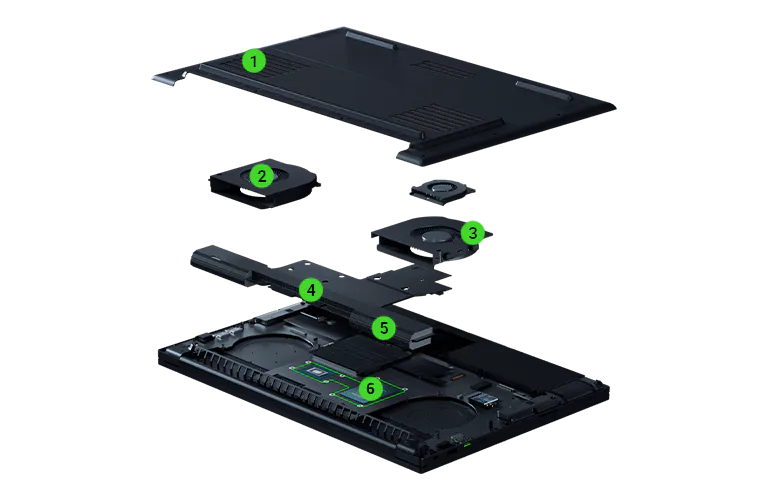 1
1Thermal Hood Design Directs airflow across key components for improved cooling coverage -
2
Triple-Fan Cooling System Increases airflow to support sustained high-performance gameplay -
3
Optimized Airflow Design Improves intake and exhaust efficiency for better thermal performance -
4
Vapor Chamber Cooling System Distributes heat evenly across CPU and GPU to prevent hotspots -
5
Ultra-Thin 0.05 mm Fins Higher fin density improves heat dissipation without restricting airflow -
6
Thermal Interface Materials Ensures reliable heat transfer and long-term durability
-
1
Thermal Hood Design Enhances airflow coverage across performance-critical components -
2
Triple-Fan Cooling System Provides consistent airflow for sustained high-power operation -
3
Optimized Airflow Design Directs airflow to maintain thermal stability during long-running workloads -
4
Vapor Chamber Cooling System Efficiently distributes heat across CPU and GPU during sustained compute -
5
Ultra-Thin 0.05 mm Fins Increases surface area for improved heat exchange efficiency -
6
Thermal Interface Materials Enables reliable heat transfer over extended usage cycles
THE WORLD’S ONLY 18-INCH DUAL-MODE DISPLAY
Immersion in 4K 240 Hz. Compete at FHD 440 Hz.
-
UHD+ 240Hz
3840 × 2400
-
FHD+ 440Hz
1920 × 1200
20% BRIGHTER DUAL-MODE DISPLAY
High-resolution Canvas for Building and Debugging
-
UHD+ 240Hz
3840 × 2400
-
FHD+ 440Hz
1920 × 1200


-

-
Up to 600 Nits
brightness in HPR Mode
-



HIGH-SPEED MEMORY. EXPANDABLE STORAGE.
Built for Modern Gaming Demands
Storage is designed to scale with your library. With up to 2TB of NVMe storage out of the box and dual M.2 slots supporting user upgrades up to 8TB (Gen4) or 4TB (Gen5), you can install large titles, high-resolution texture packs, and game captures without managing space or relying on external drives.
-
/SS0019-RAM.svg)
Run modern AAA games with high-speed DDR5-6400MHz memory -
/SS0044-large-datasets.svg)
Support extended gaming sessions with stable multitasking performance -
/SS0046-out-of-memory-error.svg)
Keep streaming, voice chat, mods, launchers, and background apps running smoothly -
/SS0045-multiple-IDEs.svg)
Spend less time managing storage and more time playing -
/SS0047-storage-models.svg)
Store large titles, high-resolution texture packs, DLC, and game captures locally -
/AS0044-extra-storage.svg)
Expand with dual M.2 slots supporting up to 8TB Gen4 or 4TB Gen5 SSDs

HIGH-SPEED MEMORY. EXPANDABLE STORAGE.
Built for Local AI and Development Workflows
Storage is designed for the same local-first workflow. With up to 2TB of NVMe storage included and dual M.2 slots supporting expansion up to 8TB with Gen4 SSDs or 4TB with Gen5 SSDs, developers can keep models, datasets, checkpoints, project files, and environments on-device—reducing reliance on external storage and improving development speed.
-
Run larger models locally with up to 128GB DDR5-6400MHz dual-channel memory -
Manage large datasets, embeddings, vector databases, and multi-process pipelines -
Reduce out-of-memory errors during experimentation -
Keep multiple IDEs, virtual machines, containers, and development environments running concurrently -
Store models, datasets, checkpoints, and project environments locally -
Expand storage with dual M.2 slots supporting up to 8TB Gen4 or 4TB Gen5 SSDs

DESKTOP CLASS CONNECTIVITY, ANYWHERE YOU GO
-
Thunderbolt 5
Thunderbolt™ 5 enables up to 120 GB/s with Bandwidth Boost and up to 100W power delivery. Connect your monitor, transfer data, and charge — all through a single port. Desktop-class I/O without the desktop.
-
/CS0019-wifi.svg)
Wifi 7
Wi-Fi 7 (802.11be) triple-band with 2x2 MIMO and Bluetooth® 5.4. Lower latency, faster speeds, and more stable connections — even on crowded networks. Lag isn't a hardware problem anymore.
-
/PH0005-camera-lens.svg)
5 MP Webcam
A 5MP IR webcam with Windows Hello and a built-in privacy shutter. Crystal clear on calls, instant biometric login, and full control over when the camera is on — and when it isn't.
SLIM DESIGN. FULL CONNECTIVITY.
Built for Complete Setups
Blade 18 delivers desktop-class capability in a refined, portable design—enabling full workflows anywhere.
-
- Thunderbolt™ 5
- HDMI 2.1
- Power Port
- Thunderbolt™ 4
- UHS-II SD Card Reader
- USB-A
- 2.5Gb Ethernet
- 3.5 mm Combo Audio Jack
- Kensington Lock

MORE PORTS
-
- Thunderbolt™ 5
- HDMI 2.1
- Power Port
- Thunderbolt™ 4
- UHS-II SD Card Reader
- USB-A
- 2.5Gb Ethernet
- 3.5 mm Combo Audio Jack
- Kensington Lock
DESIGNED FOR WORK. TUNED FOR PLAY.
Refined Keyboard & Precision Input
-
/CM0017-razer-chroma-rgb.svg) Per-Key RGB (RAZER CHROMA™)
Per-Key RGB (RAZER CHROMA™) -
1.5 mm Key Travel
-
/MISC0017-material.svg) Precision Glass Touchpad
Precision Glass Touchpad
Description not needed: The visuals in this video animation only support what is spoken; the visuals do not provide additional information.
DESIGNED FOR LONG SESSIONS
Refined Keyboard & Precision Input
-
 Per-Key RGB (RAZER CHROMA™)
 -
1.5 mm Key Travel
-
Precision Glass Touchpad

BRING THE NOISE
Immersive 6-Speaker System

CLARITY FOR EVERY WORKFLOW
Immersive 6-Speaker System

Description not needed: The visuals in this video animation only support what is spoken; the visuals do not provide additional information.
POWERED BY RAZER SYNAPSE

THE BLADE ADVANTAGE
Precision Engineering. Premium Performance.
This is a carousel with highlighted items. Use the Previous and Next buttons to browse through 5 slides.

T6-GRADE ALUMINUM

CNC-MILLED UNIBODY CHASSIS

POLISHED FOR PURITY

ANODIZED FINISH

EXPERTLY ASSEMBLED
End of carousel
ACCESSORIZE TO MAXIMIZE
ACCESSORIZE TO MAXIMIZE
This is a carousel with highlighted items. Use the Previous and Next buttons to browse through 5 slides.


End of carousel
This is a carousel with highlighted items. Use the Previous and Next buttons to browse through 5 slides.
End of carousel
Industry Leading Support
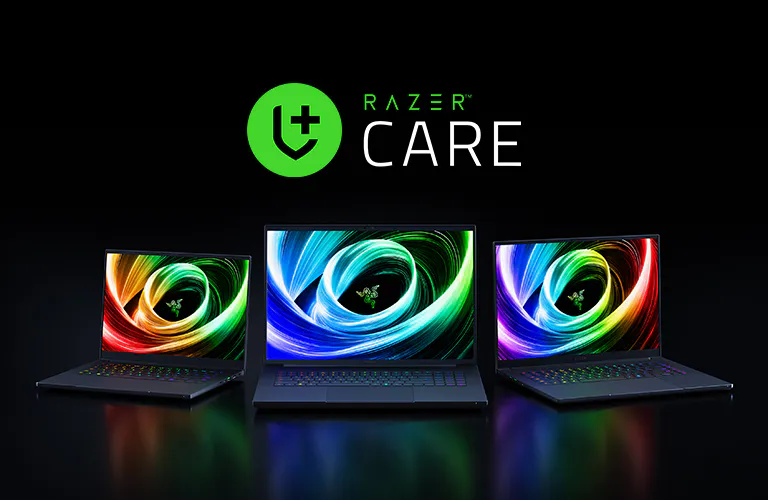
Every Razer Blade comes with an industry leading 2-year limited battery warranty and a 1-year manufacturer’s warranty.
For additional protection, get up to 3 years of repair support including accidental damage coverage with RazerCare Elite.
FAQs
-
Can the SSD be upgraded in the Razer Blade 18? Yes, the Blade 18 features dual M.2 slots, each supporting up to 8TB SSDs (PCIe Gen4), allowing for massive expandable storage to support large AI models, datasets, and creative projects. -
Can the Blade 18 run AI models locally? Yes, the Blade 18 is designed as a powerful AI development platform capable of running local AI models, testing agents, and accelerating workflows without relying solely on the cloud. -
What makes the Blade 18 different from other 18-inch laptops? The Blade 18 is engineered as a complete system—not just high specs—combining sustained performance, a precision-milled aluminum design, and the world’s only 18-inch dual-mode display for both development and competitive gaming -
What is the max TGP of the GPU? The Blade 18 supports up to 175W TGP on RTX 5080 and RTX 5090 configurations, with NVIDIA Dynamic Boost providing additional performance when needed. -
Does the Blade 18 support local AI development workflows? Yes, Blade 18 enables full local development workflows—from running models and testing applications to compiling code—allowing developers to iterate faster with greater control and lower latency. -
What is a dual-mode display? A dual-mode display allows you to switch between two optimized display settings: ultra-sharp UHD+ for development and content creation, and ultra-fast FHD+ for competitive gaming—all on the same screen. -
How does the Blade 18 maintain performance under heavy workloads? The Blade 18 features an advanced vapor chamber cooling system designed to manage high power loads and maintain stable performance during intensive tasks like AI model execution, rendering, and gaming. -
What are the benefits of Thunderbolt™ connectivity? Thunderbolt™ enables ultra-fast data transfer, support for multiple high-resolution displays, and seamless connection to high-performance peripherals—making it ideal for development, content creation, and full desktop setups. -
Does the Blade 18 support Wi-Fi 7? Yes, the Blade 18 features Wi-Fi 7, delivering faster speeds, lower latency, and improved reliability for cloud workflows, collaboration, and streaming. -
Does the Blade 18 support USB-C charging? Yes, the Blade 18 supports USB-C charging up to 100W via Power Delivery (PD 3.0), offering flexible charging options for travel and light use. -
Does the Blade 18 webcam support Windows Hello? Yes, the 5MP IR webcam supports Windows Hello for fast, secure facial recognition login and includes a mechanical privacy shutter. -
How do I maintain peak performance on the Blade 18? To maintain optimal performance, keep vents clear of dust, ensure your system and drivers are up to date, and use Razer Synapse to adjust performance settings based on your workload. -
Does the Blade 18 support NVIDIA G-Sync? Yes, NVIDIA G-Sync can be enabled via the NVIDIA Control Panel for smoother, tear-free gaming. -
What audio system does the Blade 18 include? The Blade 18 features a 6-speaker system with THX Spatial Audio, delivering rich, immersive sound for gaming, media, and creative work. -
Does the warranty cover accidental damage? The standard warranty does not cover accidental damage. For additional protection, RazerCare plans are available, offering extended coverage for drops, spills, and other incidents. -
Does the Blade 18 run Linux? Yes, the Blade 18 can run Linux. While it ships with Windows 11, many popular Linux distributions are compatible, making it a flexible option for developers. Hardware compatibility may vary depending on distribution and configuration. -
Is there any way to increase the amount of VRAM on my Blade 18? You can expand graphics capability using an external GPU via Thunderbolt™ with solutions like the Razer Core X eGPU enclosure. Additionally, Razer AI development tools and kits can help optimize and scale AI workloads across hardware. -
Does the Blade 18 have an NPU? Yes, the Blade 18 includes an integrated NPU as part of the Intel® Core™ Ultra platform, which is great for offloading AI tasks such as background processing, inference, and AI-assisted features—improving efficiency and freeing up CPU and GPU resources. -
Where can I buy the Razer Blade 18? You can purchase the product directly from Razer.com or a RazerStore near you.
FAQs
-
Can the SSD be upgraded in the Razer Blade 18? Yes, the Blade 18 features dual M.2 slots, each supporting up to 8TB SSDs (PCIe Gen4), allowing for massive expandable storage to support large AI models, datasets, and creative projects. -
Can the Blade 18 run AI models locally? Yes, the Blade 18 is designed as a powerful AI development platform capable of running local AI models, testing agents, and accelerating workflows without relying solely on the cloud. -
What makes the Blade 18 different from other 18-inch laptops? The Blade 18 is engineered as a complete system—not just high specs—combining sustained performance, a precision-milled aluminum design, and the world’s only 18-inch dual-mode display for both development and competitive gaming -
What is the max TGP of the GPU? The Blade 18 supports up to 175W TGP on RTX 5080 and RTX 5090 configurations, with NVIDIA Dynamic Boost providing additional performance when needed. -
Does the Blade 18 support local AI development workflows? Yes, Blade 18 enables full local development workflows—from running models and testing applications to compiling code—allowing developers to iterate faster with greater control and lower latency. -
What is a dual-mode display? A dual-mode display allows you to switch between two optimized display settings: ultra-sharp UHD+ for development and content creation, and ultra-fast FHD+ for competitive gaming—all on the same screen. -
How does the Blade 18 maintain performance under heavy workloads? The Blade 18 features an advanced vapor chamber cooling system designed to manage high power loads and maintain stable performance during intensive tasks like AI model execution, rendering, and gaming. -
What are the benefits of Thunderbolt™ connectivity? Thunderbolt™ enables ultra-fast data transfer, support for multiple high-resolution displays, and seamless connection to high-performance peripherals—making it ideal for development, content creation, and full desktop setups. -
Does the Blade 18 support Wi-Fi 7? Yes, the Blade 18 features Wi-Fi 7, delivering faster speeds, lower latency, and improved reliability for cloud workflows, collaboration, and streaming. -
Does the Blade 18 support USB-C charging? Yes, the Blade 18 supports USB-C charging up to 100W via Power Delivery (PD 3.0), offering flexible charging options for travel and light use. -
Does the Blade 18 webcam support Windows Hello? Yes, the 5MP IR webcam supports Windows Hello for fast, secure facial recognition login and includes a mechanical privacy shutter. -
How do I maintain peak performance on the Blade 18? To maintain optimal performance, keep vents clear of dust, ensure your system and drivers are up to date, and use Razer Synapse to adjust performance settings based on your workload. -
Does the Blade 18 support NVIDIA G-Sync? Yes, NVIDIA G-Sync can be enabled via the NVIDIA Control Panel for smoother, tear-free gaming. -
What audio system does the Blade 18 include? The Blade 18 features a 6-speaker system with THX Spatial Audio, delivering rich, immersive sound for gaming, media, and creative work. -
Does the warranty cover accidental damage? The standard warranty does not cover accidental damage. For additional protection, RazerCare plans are available, offering extended coverage for drops, spills, and other incidents. -
Does the Blade 18 run Linux? Yes, the Blade 18 can run Linux. While it ships with Windows 11, many popular Linux distributions are compatible, making it a flexible option for developers. Hardware compatibility may vary depending on distribution and configuration. -
Is there any way to increase the amount of VRAM on my Blade 18? You can expand graphics capability using an external GPU via Thunderbolt™ with solutions like the Razer Core X eGPU enclosure. Additionally, Razer AI development tools and kits can help optimize and scale AI workloads across hardware. -
Does the Blade 18 have an NPU? Yes, the Blade 18 includes an integrated NPU as part of the Intel® Core™ Ultra platform, which is great for offloading AI tasks such as background processing, inference, and AI-assisted features—improving efficiency and freeing up CPU and GPU resources. -
What frameworks does the Razer Blade 18 support for AI development? The Blade 18 supports all major AI development frameworks including PyTorch, TensorFlow, JAX, and ONNX Runtime. CUDA acceleration is available via the NVIDIA GeForce RTX GPU, and Intel OpenVINO™ can be used to optimize inference on the CPU and NPU. -
Does the Blade 18 support Thunderbolt 5? Yes, the Blade 18 includes Thunderbolt™ 5 with up to 120 GB/s Bandwidth Boost, 100W power delivery, and support for up to 3 external 4K displays simultaneously. -
Where can I buy the Razer Blade 18? You can purchase the product directly from Razer.com or a RazerStore near you.
Legal
Gaming Performance (vs. MacBook Pro): Based on internal tests on 4/16/26 using pre-production Blade 18 (RTX 5090) vs. MacBook Pro M5 Max using Assassin’s Creed Shadows, measured in Frames Per Second (FPS). Performance in other models, settings, or workloads will vary.
Legal
Gaming Performance (vs. MacBook Pro): Based on internal tests on 4/16/26 using pre-production Blade 18 (RTX 5090) vs. MacBook Pro M5 Max using Assassin’s Creed Shadows, measured in Frames Per Second (FPS). Performance in other models, settings, or workloads will vary.