

You are currently on the Europe-English site.
Select a location to view location-specific content and shop online.
Get €50 Razer Store Credit when you order the Razer Soma Pro during launch week. Shop now
Description not needed: The visuals in this video animation only support what is spoken; the visuals do not provide additional information.

RAZER SOMA PRO
FEATURES AT A GLANCE
/LS0022-true-position-haptics.svg)
/AU0039-THX.svg)
/CM0012-chroma-ring.svg)
/LS0001-ergonomic-lumbar-support.svg)
/LS0029-dual-density-cold-cure-foam.svg)
/LS0035-recline.svg)
MEET THE RAZER SOMA PRO
This is a carousel with highlighted items. Use the Previous and Next buttons to browse through 6 slides.


IMMERSIVE SURROUND SOUND


End of carousel
IMMERSE IN 300+ RAZER CHROMA™ RGB INTEGRATED GAMES

FEEL EVERY MOMENT ACROSS 100+ RAZER SENSA™ HD HAPTICS INTEGRATED GAMES

HEAR EVERY DIRECTION IN 360° THX® SPATIAL AUDIO

BEHIND THE SOMA PRO

Follow our step-by-step assembly guide to set up your Razer Soma Pro quickly and correctly.

BUILT TO SUPPORT ALL SHAPES & SIZES
Recommended Size
Height: 165 to 200 cm (5’5” to 6’6”)
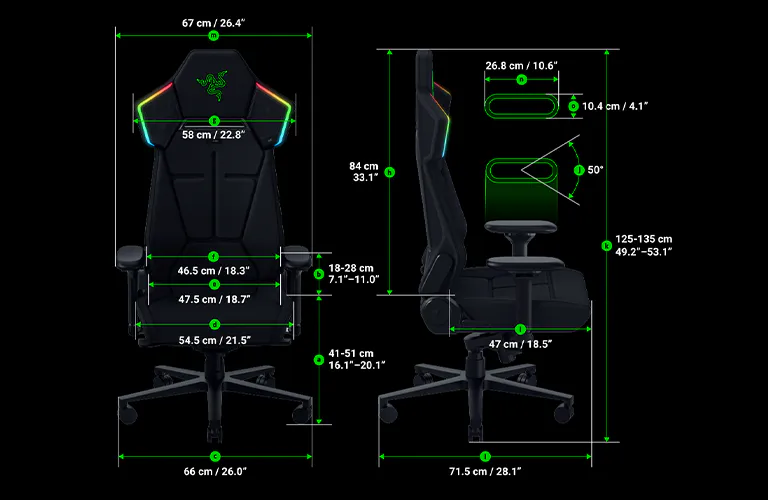
a Floor-to-Seat Height 41 – 51 cm / 16.1 – 20.1 in
b Seat-to-Armrest Height 18 – 28 cm / 7.1 – 11.0 in
c Wheelbase Width 66 cm / 26.0 in
d Seat Width (Including Sides) 54.5 cm / 21.5 in
e Seat Pan Width 47.5 cm / 18.7 in (front)
f Armrest-to-Armrest Distance
(Inter-Armrest Distance) 46.5 cm / 18.3 in
g Backrest Width 58 cm / 22.8 in
h Backrest Height 84 cm / 33.1 in
i Seat Depth 47 cm / 18.5 in
j Armrest Inward-Outward Rotation Adjustment 50 degrees
k Overall Height (min – max) 125 – 135 cm / 49.2 – 53.1 in
l Overall Depth 71.5 cm / 28.1 in
m Overall Width 67 cm / 26.4 in
n Armrest Pad Overall Length 26.8 cm / 10.6 in
o Armrest Pad Overall Width 10.4 cm / 4.1 in
We’ve Got You Covered
-

Every Razer Soma Chroma gaming chair comes with a 3-year limited warranty, backed by a dedicated team of chair support experts. -

Upgrade to a 5-year limited warranty for free by joining our Extended Warranty Program, exclusive for Razer.com.
Learn More -

Can't commit just yet? No problem. Purchase directly from RazerStore and get 14 days of risk‑free returns on your gaming chair.


A CHAIR FOR EVERY GAMER
RAZER SOMA PRO - FREQUENTLY ASKED QUESTIONS
-
What is the difference between Razer Soma Pro, Razer Soma Sensa HD Haptics and Razer Soma Chroma? The Razer Soma Pro is a fully immersive chair powered by Razer Sensa HD Haptics, THX Spatial Audio, and Razer Chroma™ RGB. Razer Soma Sensa HD Haptics is powered by Razer Sensa HD Haptics only while Razer Soma Chroma is powered by Razer Chroma™ RGB only. If you are looking for a fully immersive chair, Razer Soma Pro is your all-in-one choice. -
What height and weight range is the Razer Soma Pro designed for? The chair is recommended for users between 165 – 200 cm (5’5” – 6’6”) in height and supports a maximum load of 150 kg (331 lbs). This range covers a wide variety of body types while ensuring optimal ergonomic performance. -
What's included in the box? The Razer Soma Pro chair (with built-in control panel), a USB Type-C extension cable (200 mm), a hex key tool for chair assembly, and the Important Product Information Guide (IPIG). A power bank is not included, please purchase your own compatible power bank separately (see Power Requirements in the Tech Specs for the specs needed). A power adapter is also not included. -
How is the Razer Soma Pro powered? The chair can be powered by a power bank (not included) via its USB Type C connection, or from a wall outlet using a power adapter (not included) and an included USB Type C extension cable. Refer to the Tech Specs for detailed power requirements. -
What is the recommended brightness setting for Razer Soma Pro’s RGB lighting? The ideal setting depends on your environment: darker rooms with glossy or reflective monitors often pair well with lower brightness, while brighter rooms with matte screens work well with higher brightness. As a starting point for most setups, we recommend 60%. You can adjust across 10 levels directly on the chair's control panel, or fine-tune further in Razer Synapse. -
What’s special about the dual-density cold-cured foam seat cushion? The dual-density cold-cured foam is tuned for both softness and support, with a plush top layer and a firmer base. This balances pressure distribution across your hips and thighs, helping to reduce hot spots and discomfort over long periods of sitting. -
How do I control haptic intensity on the Razer Soma Pro, and which games/content support it? In Razer Synapse, use the universal HAPTIC INTENSITY control to adjust the vibration strength across all six motors at once, on a scale of 1 to 6. For finer control, you can also adjust each of the six individual motor zones independently, from 0% to 100%. For the full list of supported games and content, visit the Sensa Games page. -
How does the Razer Soma Pro sync with Razer Synapse? The chair connects wirelessly to your PC via the included USB Type A HyperSpeed Wireless dongle and is fully compatible with Razer Synapse. -
How does the Razer Soma Pro sync with Razer Furniture app? The chair connects via Bluetooth® LE to the Razer Furniture app on Android and iOS devices, letting you customize haptic, audio, and RGB settings straight from your phone—no PC or Synapse required. Razer Furniture app also enables audio playback and Audio-to-Haptics from your phone. -
Does Audio-to-Haptics work on iOS while screen recording is active? Yes, for most apps. However, apps with protected content, such as Netflix or Apple Music, may block or mute system audio during screen recording. As a result, Audio-to-Haptics cannot detect the audio from these apps. Turn off screen recording to restore audio playback. -
Can the Razer Soma Pro be used without Razer Synapse? Yes. For added convenience, the chair’s haptic, audio, and RGB settings can be controlled directly via the builtin control panel with limited functionality, even without Synapse on PC, or Furniture app on mobile. Synapse is required to unlock the full experience—including syncing with Chroma or Sensa-integrated games, and other Chroma or Sensa-enabled gear. -
How do I care for and clean the Razer Soma Pro? The chair requires minimal maintenance to stay in optimum condition, though constant exposure to friction, skin contact, and bodily fluids can degrade materials over time. Always disconnect the chair from the power bank or power adapter before cleaning or storing it. We recommend cleaning the chair once a month to prevent buildup from perspiration and dirt, and cleaning up spills immediately, and letting the chair air dry completely before use. Use soft or microfiber cloth lightly dampened with warm water to wipe down the chair surfaces, and a soft, dry cloth for the control panel and lighting. Avoid soap, liquids, chemical cleaners, or abrasives, as these can damage the chair or its electronic components. -
Where can I purchase the Razer Soma Pro near me? Buy online at Razer.com or locate a store near you.