Razer Discord Exclusive: 1,337,000 Silver + hardware bundles + exclusive gear all up for the hunt. Learn more >
Razer Pro Type Ergo
Starting from €199.99
Starting from €199.99
Description not needed: The visuals in this video animation only support what is spoken; the visuals do not provide additional information.
RAZER PRO TYPE ERGO
SPLIT ERGONOMICS. UNTETHERED PERFORMANCE.
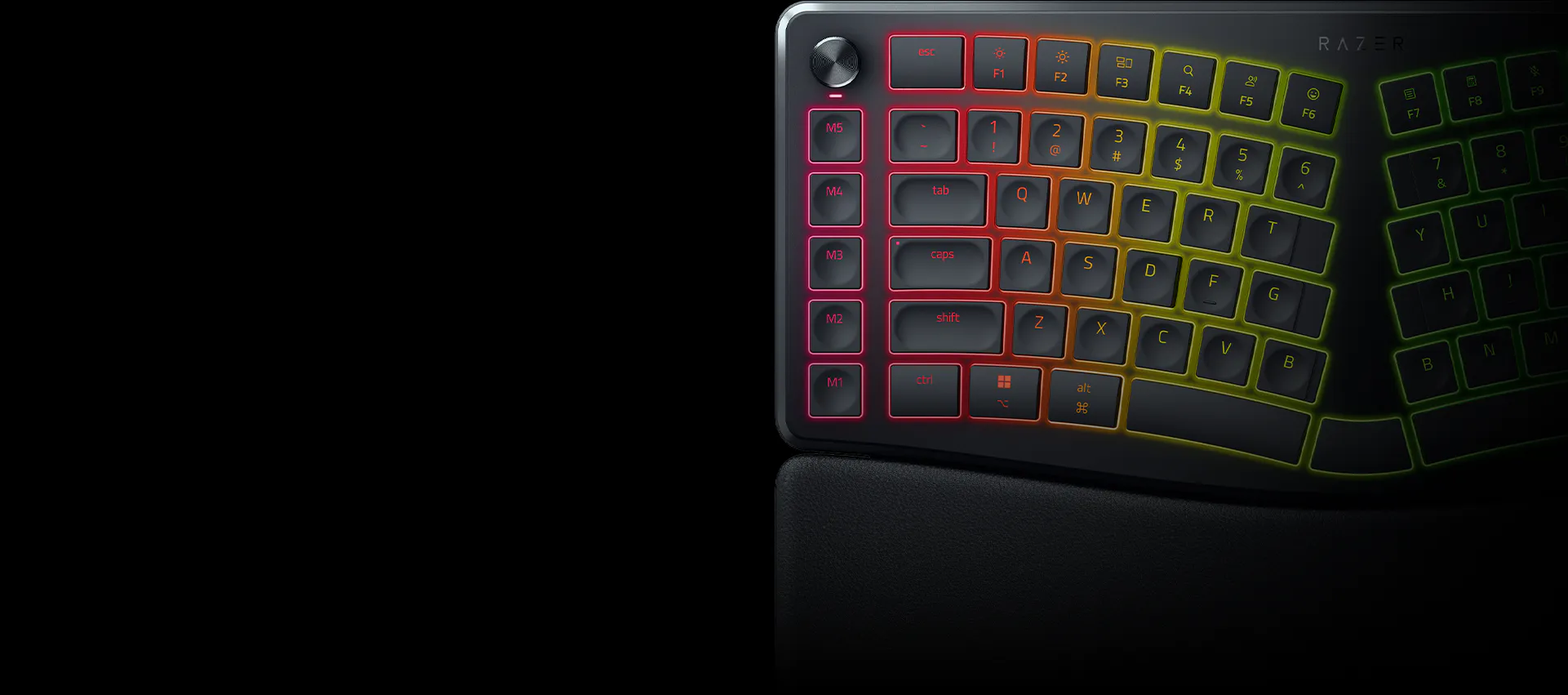
Experience typing at its most natural with our first wireless split ergonomic keyboard powered by Razer Chroma™ RGB. Shaped to fit your hands’ natural resting position, go all day for work without strain or fatigue, as you expand your control with the Razer Command Dial, 5 macro keys, and more.
This is a carousel.
Use Next and Previous buttons to navigate, or jump to a slide using the slide dots.
Premium feel, comfortable ergonomic design, and seamless multi-device switching make it a standout keyboard.
- Babar Designer
The inward‑angled design, comfy wrist rest, and smooth low‑profile keys make typing noticeably more comfortable and far less tiring—even during long workdays. From emails to editing and gaming, performance never takes a hit, and my wrists genuinely thank me.
- Tim Ahlert Head of Marketing
The Pro Type Ergo impressed me right away with its sleek design and satisfying key feel. The split spacebar was easy to adjust to, and it made typing and gaming feel comfortable and natural. It’s the cool, gamer-focused ergonomic keyboard I’ve been searching for.
- Megan Everett Community Director
The Pro Type Ergo felt comfortable from the first touch, with instant wrist relief as soon as I started typing. The build quality feels top-notch, and the low-profile keys make a real difference in speed and precision. I was skeptical at first, but this feels like a keyboard I’ll be sticking with for a long time.
- Alexey Semenchenko Head of Industry Relations
The Pro Type Ergo feels thoughtfully built for long hours of typing and play. Its low-profile tactile keys allow for smooth, uninterrupted keystrokes while still delivering the satisfying feedback expected from full-height switches. The intuitive layout, programmable controls, and integrated wrist rest make it easy to use comfortably.
- Michael Bakaleinik Senior Business Development Manager, Hardware partner relations lead
The Pro Type Ergo feels thoughtfully designed, with extra keys, adjustable angles, and multiple spacebars making the split layout more functional. Despite its unique shape, it feels sturdy and well-built, with an integrated wrist rest that adds to the comfort and solid feel. The flowing arc of the board feels natural to move across, while the customizable Chroma lighting looks great and makes it easy to add a personal touch.
- Katja Linssen Environment Artist
The Pro Type Ergo improves comfort without forcing me to relearn a new layout. I like the adjustable tilt options, specifically the negative tilt, which relaxes my wrists when using the keyboard while standing and helps longer work or play sessions feel easier. The quiet low-profile switches and well-placed left-side macro keys make it practical and comfortable, while the command dial on the left adds useful everyday control with its selection of tools built into the software.
- Frank Lee NA Community Manager
The Pro Type Ergo is a good take on the traditional ergonomic keyboard, with individually adjustable legs that make it easy to find a comfortable wrist angle. The keys feel responsive and comfortable, making it one of the best rubber dome typing experiences I’ve tried. The handy macro keys, flexible software, and key reassignment options also make it easy to customize the keyboard around my own workflow.
- Lexi Mayfied Software Engineer
Took me a couple days to adjust to the bump of the keyboard, as well as the separated nature of the letters. As soon as I got the hang of it, it has been really comfortable and easy to use. The long wrist rest at the bottom of the keyboard is probably the best part of it, since I've had a ton of keyboards in the past that you have to hover over at the bottom, or have the bottom of your hand rest on the desk itself which can get uncomfortable after a while. There's also a bit of customization you can do to make it your own. Once you get comfortable with the spacing of the keys, it becomes very useful and comfortable to use in every way
- Zack Manko Head of Level Design
I’ve been using the keyboard over the past days and I’m really enjoying it. The split ergonomic layout felt natural surprisingly quickly, and it makes long writing and coding sessions noticeably more comfortable. The build quality and key feel are excellent, and the overall design strikes a nice balance between productivity and the signature Razer aesthetic.Happy to see Razer exploring more tools aimed at creators and developers!
- Valerio Di Donato CEO
Excellent support for wrists, clean design and premium build quality. The keyboard has a very nice and premium feel to it, with great height adjustment, very nice buttons and excellent quality on the dials. The keyboard feels very ergonomic thanks to the layout and comfortable wrist rest.
- Johan Jons Publishing Production Manager
The Pro Type Ergo felt natural right out of the box. The split layout and adjustable tilt support better wrist and shoulder positioning, while the typing experience stays familiar and intuitive.
- PJ Martin Marketing Manager
The keyboard feels great to use, with excellent buttons, a high‑quality volume dial, and an intuitive layout that’s quick to adapt to. The height adjustment options are well implemented, and once I got used to it, it became genuinely comfortable for typing and programming.
- Rick van Miltenburg Programmer
This is my first time using an ergonomic keyboard and I must say I am a FAN! It has really improved my daily PC tasks and of course has the looks and quality i've come to expect with Razer products. I never realized how uncomfortable I was using the standard keyboards until I tried this one out.
- Nick Mann Director of Operations
As a CEO, I spend most of my day emailing and reviewing business documents. The Razer Pro Type Ergo’s soft keys and premium design make it an essential part of my daily workflow.
- Mike Arkin CEO
Our team had a very positive experience, especially with the comfort and customization. The Razer Pro Type Ergo's built‑in wrist rest, dials, and key mapping options stood out, delivering a distinctive ergonomic experience with excellent wrist support.
- SNK Singapore
SPLIT ERGONOMIC LAYOUT
With Fully Adjustable Typing Angle
Enjoy satisfying, strainfree typing with an ergonomic design and adjustable tilt that supports your hands’ natural posture—seated or standing.
SCULPTED FOR ERGONOMICS
Sculpted with a 10° slope to support optimal wrist posture for maximum comfort over extended periods of typing.
SPLIT ERGONOMIC LAYOUT
Designed with a split ergonomic layout to support a more natural hands resting position, reduce lateral movement, and experience a satisfying, strain-free typing experience.
FULLY ADJUSTABLE TYPING ANGLE
With both forward and backward tilt options of 4° or 7°, finetune how you work at different heights.
ULTRA LOW-PROFILE FINGERTIP-SHAPED KEYCAPS
Greater Typing Comfort and Precision
Sculpted with spherical indents, the keycaps guide your fingertips for greater comfort and precision, complemented by a lower profile to ensure faster typing with reduced strain.
BUILT-IN PLUSH WRIST REST
Long-Lasting Support and Comfort
Whether you’re pulling a work all-nighter or tackling back-to-back deadlines, keep your hands feeling fresh with a cushioned wrist rest that minimizes wrist pressure and fatigue.
DUAL “B” KEYS
Reduce finger crossover and supports a more natural typing posture.
From reducing strain to enabling a natural typing flow, our dual “B” key design makes typing faster and more comfortable. It’s a small change with a big impact.
AI PROMPT MASTER
Boost Your Productivity
Summarize text, draft emails and more with just one press. Unlock powerful shortcuts via Razer Synapse, save them to the keyboard and streamline your workflow instantly for AI tools.
ONE-TOUCH ACCESS
Access AI Prompt Master with just one press.
COMPOSE EMAILS
Use AI Prompt Master to craft emails quickly, efficiently, and concisely—turning ideas into polished messages in seconds.
SUMMARIZE
Prompt Master empowers users to generate clear, concise summaries of emails or notes with ease, streamlining communication workflows.
RAZER™ COMMAND DIAL AND 5 DEDICATED MACRO KEYS
All-Around Control at Your Fingertips
Assign up to 8 custom functions to the dial and create up to 100 via Razer Synapse. Further streamline your work by mapping your most frequently used keybinds to an extra column of macro keys.
This is a tab. Use the buttons to navigate into any tabpanel.
RAZER SYNAPSE PROFILE ADOBE ILLUSTRATOR
Artboard Tool
Send Backward
Bring Forward
Redo
Undo
RAZER SYNAPSE PROFILE ADOBE PHOTOSHOP
Fit on Screen
Duplicate Layer
New Layer
Redo
Undo
RAZER SYNAPSE PROFILE ADOBE AFTER EFFECT
Toggle Layer Controls
Trim Layer Out to Current Time
Trim Layer In to Current Time
Split Layer
Pre-compose
RAZER SYNAPSE PROFILE ADOBE PREMIERE PRO
New Sequence
Extract Clip
Lift Clip
Ripple Delete
Undo
RAZER SYNAPSE PROFILE DAVINCI RESOLVE
Switch to Fairlight Page
Switch to Color Page
Switch to Fusion Page
Switch to Edit Page
Switch to Media Page
RAZER SYNAPSE PROFILE MICROSOFT EXCEL
Delete Cells (Row/Column)
Insert Cells (Row/Column)
Format Cells
Fill Down
AutoSum
RAZER SYNAPSE PROFILE MICROSOFT WORD
Insert Hyperlink
Add Comment
Remove Paragraph Formatting
Add Hanging Indent
Indent Paragraph
RAZER SYNAPSE PROFILE MICROSOFT POWERPOINT
Switch to Slide Sorter View
Ungroup Objects
Group Objects
Duplicate Slide
Insert New Slide
RAZER SYNAPSE PROFILE GOOGLE CHROME
Reopen Closed Tab
Close Current Tab
Open New Tab
Cycle to Previous Tab
Cycle to Next Tab
RAZER SYNAPSE PROFILE MICROSOFT EDGE
Reopen Closed Tab
Close Current Tab
Open New Tab
Cycle to Previous Tab
Cycle to Next Tab
RAZER SYNAPSE PROFILE FIREFOX
Reopen Closed Tab
Close Current Tab
Open New Tab
Cycle to Previous Tab
Cycle to Next Tab
RAZER SYNAPSE PROFILE MICROSOFT TEAMS
Open Settings
Raise Hand
Open 3rd App on App Bar
Open 2nd App on App Bar
Open 1st App on App Bar
19-ZONE RGB BACKLIGHTING
Powered by Razer Chroma™ RGB
Illuminate your workspace with vibrant Chroma RGB backlighting for a personalized, dynamic typing experience. Subtle backlighting improves key visibility during late‑night conference calls, allowing you to stay productive in low‑light environments without turning on harsh overhead lighting.
Description not needed: The visuals in this video animation only support what is spoken; the visuals do not provide additional information.
MORE FEATURES
RAZER HYPERSPEED WIRELESS
Powered by industry-leading wireless technology, enjoy fast, reliable performance that gives you more work freedom and efficiency while keeping your workspace clean and cable-free.
5-WAY MULTI DEVICE CONNECTIVITY
Connect to your PC, laptop, tablet, and more, and toggle between devices instantly with a dedicated button.
UP TO 3 MONTHS OF BATTERY LIFE ON A SINGLE CHARGE*
Built for endurance, our ergonomic productivity keyboard features an efficient, long-lasting battery that keeps you powered for uninterrupted work.
*Under standard test conditions
We’ve Got You Covered
Get up to 2 years of warranty and access reliable tech support. Purchase directly from RazerStore and get 14 days risk‑free returns.
FAQs
How do I check the battery life status on the Razer Pro Type Ergo?
Pressing the battery level button on the top right will display the battery level: green for full, yellow for ~50%, and red for low.
Can I use the Razer Pro Type Ergo while I am charging via the USB C cable?
Yes, you may continue to use the Razer Pro Type Ergo while charging using the USB C cable.
Where can I find the USB Dongle for the Razer Pro Type Ergo?
The USB Dongle is stored in a compartment underneath the keyboard at the right-side bottom. Simply lift the adjustable tilt legs. Look for the USB Dongle icon.
Do I need Razer Synapse to use the Razer Pro Type Ergo?
You do not need Razer Synapse to use Razer Pro Type Ergo. However, Razer Synapse offers additional features and customization that can enhance your experience.
Sign up for our Razer newsletter to unlock a special discount code for Razer gear and be the first to know about our latest specials and product releases.
Thanks for signing up.
Check your inbox and verify your email address to receive your €10 off promo code.

















/TN0005-razer-hyperspeed-wireless.svg)
/MC0048-mice-connectivity.svg)
/MC0007-battery-life.svg)