Razer Discord Exclusive: Unlock 20,000 Bonus Silver plus an exclusive Razer Rogue Backpack V3 Miniature Edition. Learn more >
Razer Kraken V4 Pro
Starting from HK$2,999.00
Starting from HK$2,999.00
Razer Kraken V4 Pro Wireless RGB Gaming Headset with OLED Control Hub
Description not needed: The visuals in this video animation only support what is spoken; the visuals do not provide additional information.
RAZER KRAKEN V4 PRO
FULL IMMERSION. FULL CONTROL.
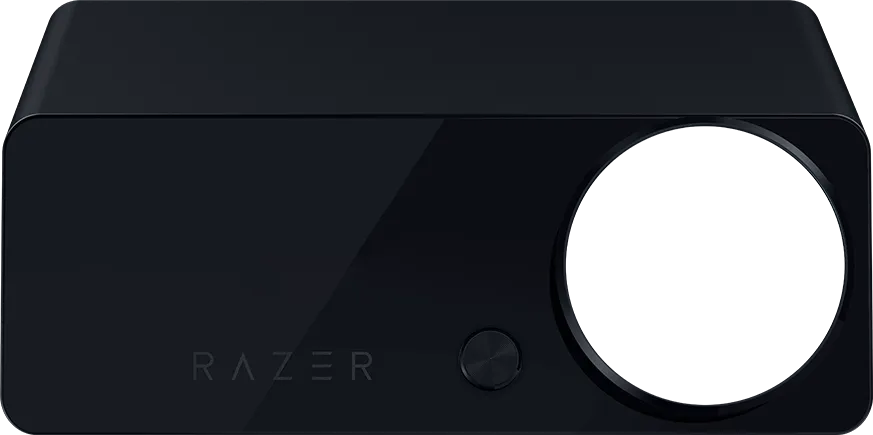
Experience next-gen immersion with the Razer Kraken V4 Pro—a wireless RGB headset powered by Razer Sensa HD Haptics. Equipped with a dedicated OLED Control Hub for maximum command at your fingertips, send your gaming into overdrive with the ultimate battlestation headset that can do it all.
This is a carousel.
Use Next and Previous buttons to navigate, or jump to a slide using the slide dots.
"…not only ticking all the boxes for quality and comfort, but adding industry-leading haptic feedback to take you a step beyond just sound and into feeling too."
- T3
"It's the best of almost everything Razer has put into a gaming headset."
- Windows Central
"Some of the cleanest recordings I’ve captured from a headset mic."
- CG Magazine
"Takes immersion to a whole new level."
- Breakflip
"A headset that will take your gaming experience to a new level."
- One Tech
"These are probably the best gaming headphones on the market."
- Geektopia
OLED CONTROL HUB
Full Customizability and Multi-Platform Connectivity
Centralize the control of your battlestation with one powerful device featuring over 20 customization options. Personalize your experience by adjusting audio, haptics, power-saving, and home screen settings easily via an ergonomically angled interface.
Description not needed: The visuals in this video animation only support what is spoken; the visuals do not provide additional information.
QUICK ACCESS MODES
Instantly adjust to your liking with an intuitive clickable control knob.
HOME SCREEN
Customize the OLED display to show a wide range of visuals and text.
Tap the 'MODE' button on the OLED Control Hub to cycle through nine essential settings.
Adjust the level of your system volume.
Select between 4 audio EQ profiles: Game, Movie, Music, and Custom.
Select between 4 haptic profiles: Controlled, Balanced, Dynamic, and Custom.
Adjust the strength of haptic feedback.
Switch between multiple audio input sources based on devices connected.
Set the level of your mic monitoring sidetone.
Find the perfect mix between game and chat audio.
Adjust the level of Razer Chroma RGB lighting.
Adjust the level of OLED display brightness.
Display preset GIF animation or upload your own via Razer Synapse.
Obtain vital information of your system at a glance.
Show your current headset status and settings.
Display preset static image or upload your own via Razer Synapse.
Obtain useful information on the current track with an interactive audio visualizer.
Customize any text or quote that continuously scrolls across the display.
CHOOSE YOUR LOADOUT
RAZER SENSA™ HD HAPTICS
Next-Gen Haptic Feedback
Feel your games like never before with the next leap in haptic technology. Experience layered and realistic haptic feedback that mirrors the intensity, direction, and duration of in-game audio.
Description not needed: The visuals in this video animation only support what is spoken; the visuals do not provide additional information.
HAPTIC SOURCE
Enjoy seamless haptics with Razer Sensa HD, as it automatically switches between Integrated Sensa HD Haptics and Audio-to-Haptics while you play.
Audio-to-Haptics
Sensa HD Haptics supports real-time audio-to-haptics conversion. Designed to work with all forms of audio content, enjoy your favorite games, movies and music with next-level immersion. Enhance your enjoyment even further with an ever-growing list of Sensa-tuned game profiles created to meet your specific preference.
Overhaul your gaming sessions and reach new heights of immersion through specially tuned haptic effects created in partnership with game developers. Experience in-game events such as cutscenes and character actions through countless custom, high-definition haptic effects–blurring the lines between game and reality.
See Sensa HD Haptics in action across supported games and visualizers, showcasing high-definition feedback that reacts to every moment.
Description not needed: The visuals in this video animation only support what is spoken; the visuals do not provide additional information.
007 First Light
Description not needed: The visuals in this video animation only support what is spoken; the visuals do not provide additional information.
Marvel Rivals
Dynamic Haptics
Dynamic Haptics combines integrated Sensa HD Haptics and real-time Audio-to-Haptics to deliver high-definition feedback across gameplay events and ambient sound.
Description not needed: The visuals in this video animation only support what is spoken; the visuals do not provide additional information.
Borderlands 4
Description not needed: The visuals in this video animation only support what is spoken; the visuals do not provide additional information.
Marvel Rivals
This is a carousel with panning animation. Use the Play and Pause
button to start and stop the animation.
007 First Light
Silent Hill 2
Battlefield 6
Borderlands 4
Final Fantasy XVI
S.T.A.L.K.E.R. 2: Heart of Chornobyl
Hitman World of Assassination
Frostpunk 2
MechWarrior 5: Clans
Once Human
World of Warships
SnowRunner
007 First Light
Silent Hill 2
Battlefield 6
Borderlands 4
Final Fantasy XVI
S.T.A.L.K.E.R. 2: Heart of Chornobyl
Hitman World of Assassination
Frostpunk 2
MechWarrior 5: Clans
Once Human
World of Warships
SnowRunner
Fate Trigger: The Novita
Symphonia
Screw Drivers
The Coma 2B
PC Building Simulator 2
Pinball FX
Sniper Elite: Resistance
Vendetta Online
Fate Trigger: The Novita
Symphonia
Screw Drivers
The Coma 2B
PC Building Simulator 2
Pinball FX
Sniper Elite: Resistance
Vendetta Online
4 MODES OF CONNECTIVITY
Razer™ HyperSpeed Wireless | Bluetooth | USB Wired | 3.5 mm
Whether you’re on PC, PlayStation, Nintendo Switch, or mobile, enjoy full audio immersion with Razer’s first gaming headset to offer 4 modes of connectivity. Supporting HyperSpeed Wireless, Bluetooth, USB, and 3.5 mm connections, the Kraken V4 Pro adapts to how you play. With the OLED Control Hub you can also keep up to 3 systems connected at the same time and switch between audio sources with seamless convenience.
Description not needed: The visuals in this video animation only support what is spoken; the visuals do not provide additional information.
SIMULTANEOUS 2.4GHz & BLUETOOTH AUDIO
Listen in to two audio connections simultaneously when using Razer HyperSpeed wireless alongside a Bluetooth device. Stay on comms with your squad at all times via Discord on mobile whilst playing your favorite games on PC/Console.
RETRACTABLE RAZER™ HYPERCLEAR SUPER WIDEBAND MIC
High-Definition, Pro-Level Voice Quality
Featuring technology derived from our award-winning Razer BlackShark V2 Pro, this next-gen retractable mic captures an incredible amount of detail in your voice by covering a wider frequency range of sound, so that everything you say sounds clear, rich, and natural.
FLUSHED RETRACTABLE DESIGN
Seamless Ease-of-Use
Simply pull out the mic and be ready to go. Get it into the perfect position thanks to a flexible gooseneck wire, and easily tuck it back into the earcup when not in use. Additionally, easily view your mic status with a conveniently-located mic mute indicator.
Description not needed: The visuals in this video animation only support what is spoken; the visuals do not provide additional information.
RAZER™ TRIFORCE BIO-CELLULOSE 40 MM DRIVERS
Natural, High-End Sound
Our upgraded Razer TriForce Driver design utilizes an ultra-thin bio-cellulose diaphragm, improving the soundstage and reducing distortion for distinct clarity and deep bass reproduction. Enjoy the rich environmental sounds of your in-game world with clear distinction between voices and audio cues.
Description not needed: The visuals in this video animation only support what is spoken; the visuals do not provide additional information.
THX SPATIAL AUDIO
Extreme Audio Precision & Realism
Bring your games to life with a fully immersive 3D audio experience powered by advanced spatial algorithms. Get a true sense of audio depth and positioning that places you in the middle of all the action.
Further optimize the sound design of your favorite games for an ever-growing list of over 60 popular titles. Dive right into games like Apex Legends and Call of Duty with custom-tuned EQ settings already loaded.
Enjoy new, stunning lighting effects made possible with 9-zone earcup lighting. With access to 16.8 million colors and a suite of lighting effects, apply your preferred settings and watch it work seamlessly with over 300 games and 500 devices across more than 50 partners.
Description not needed: The visuals in this video animation only support what is spoken; the visuals do not provide additional information.
CUSTOMIZE INDIVIDUAL LIGHTING ZONES IN CHROMA STUDIO
Personalize and unlock additional Chroma effects
Description not needed: The visuals in this video animation only support what is spoken; the visuals do not provide additional information.
LASTING DURABILITY. ALL-DAY COMFORT.
Protein Leatherette with Memory Foam Ear Cushions
Premium leatherette with increased durability and specially selected ultra-soft memory foam to best conduct haptic feedback directly to your ears.
Swivel Mechanism
Provides a better fit over the ears and improves noise isolation.
FEEL IT FOR YOURSELF AT RAZERSTORE
Visit your nearest RazerStore and test out our latest gear powered by Razer Sensa HD Haptics. Have your mind blown by the most realistic and complex tactile sensations at the Sensa Experience Zone.
Wireless: Razer™ HyperSpeed Wireless Technology (2.4 GHz) + Bluetooth 5.3 with Simultaneous Audio
Wired: USB Type-A + 3.5 mm*
Wireless: Razer™ HyperSpeed Wireless Technology (2.4 GHz) + Bluetooth 5.3
Wired: USB Type-A
BATTERY LIFE
Up to 50 hours (Haptics/Lighting OFF, 2.4 GHz connection)
Up to 45 hours (Haptics/Lighting OFF, 2.4 GHz + BT connection)
Up to 13 hours (Haptics and Lighting ON, 2.4 GHz connection)
Up to 70 hours (Lighting OFF, 2.4 GHz connection)
Up to 35 hours (Lighting ON, 2.4 GHz connection)
WEIGHT
397 g (not including OLED Control Hub)
350 g
*3.5 mm port located on OLED Control Hub
We’ve Got You Covered
Get up to 2 years of warranty and access reliable tech support. Purchase directly from RazerStore and get 14 days risk‑free returns.
FAQS
What’s new with the Razer Kraken V4 Pro?
The Razer Kraken V4 Pro features Sensa HD Haptics and an all-new OLED Control Hub. It is Razer’s first headset to offer 4 connectivity options: 2.4 GHz wireless, Bluetooth, USB wired, and 3.5 mm. Design changes include a swivel mechanism, a flushed & retractable Razer HyperClear Super Wideband Mic, and 9-zone earcup lighting powered by Razer Chroma RGB.
Can I customize the home screen on the OLED Control Hub?
Yes. You can choose different animations, images, emotes, or text, and you can also upload your own GIFs and images for use directly on the OLED Hub.
How do I activate THX Spatial Audio?
THX Spatial Audio comes automatically with the Razer Kraken V4 Pro and is integrated within Razer Synapse. Download Razer Synapse here.
What audio EQ profile should I be using?
The ‘Game’ EQ is tuned for competitive play, while ‘Music’ and ‘Movie’ EQs are optimized for general listening. A ‘Custom’ EQ is also available if you prefer to adjust your own settings in Razer Synapse.
What is the best way to experience Sensa HD Haptics?
The best way to experience Sensa HD Haptics is through Dynamic Haptics Mode, which combines specially designed Integrated Sensa HD Haptics gameplay‑driven effects with Audio‑to‑Haptics, to deliver directional, real‑time haptic feedback synced directly to the game.
In supported games, key actions like weapon recoil, movement, impacts, and abilities trigger intentional, developer‑authored haptic effects, while Audio‑to-Haptics automatically activates any events not defined by the game developer. This creates the best of both worlds: precise, moment‑critical feedback when it matters, and continuous ambient sensation when it doesn’t—so there’s no downtime in the haptics experience, even between scripted events.
Do I have to activate Razer Sensa HD Haptics?
Razer Sensa HD Haptics works right out of the box without any additional activation or installation needed. Additionally, the Razer Chroma app on Synapse 4 will unlock further haptics customization with Sensa HD Haptics.
Are there different audio-to-haptic profiles I can choose from?
Yes, there are 4 different profiles available. ‘Controlled’ is a bass-focused profile with a subwoofer-like response, designed to enhance bass presence with physical sensations. ‘Balanced’ is optimized to provide a smooth response for mild scenes and strong responses for high-intensity events. ‘Dynamic’ is a reactive profile maximizing immersion and spatial awareness, allowing action-packed events to feel more vivid and present. ‘Custom’ allows you to pick from any of the previous profiles and personalize it further by setting your own frequency ranges and haptic gain.
How do I use simultaneous audio on the Razer Kraken V4 Pro?
Once you have paired the headset with your Bluetooth device, double-tap the Multi-function button (MFB) on the headset to cycle through connection modes and enter simultaneous audio connection. You will now be able to listen in on both 2.4 GHz and Bluetooth audio streams at the same time.
What can I control with the on-earcup Multi-function button (MFB) & Sensa button?
Sensa button – Single tap to select haptics intensity (Low, Med, High, Off), Double tap to select audio-to-haptic profile (Controlled, Balanced, Dynamic, Custom)
MFB – Press and hold for 7 sec to enter Bluetooth pairing mode, Single tap to select audio EQ profile (Game, Movie, Music, Custom), Double tap to select wireless mode (HyperSpeed Wireless, Bluetooth, Simultaneous Audio)
How long does it take to charge the Razer Kraken V4 Pro?
A full charge of 50 hours of play time will take around 4 hours, while 15 minutes of charge will yield approximately 5 hours of play time.
GET HK$80 OFF YOUR NEXT ORDER
Sign up for our Razer newsletter to unlock a special discount code for Razer gear and be the first to know about our latest specials and product releases.
Thanks for signing up.
Check your inbox and verify your email address to receive your HK$80 off promo code.