

In GTA V, the moments worth saving often happen before you have time to think about recording them. A routine drive across Los Santos can turn into a wanted chase, a mission can end cleaner than expected, or one bad landing can become the clip everyone wants to see again.
These are the moments that make GTA V sessions easy to retell and hard to recreate. With Auto-Clipping support for GTA V now available through Razer Cortex Game Clips, supported in-game events can be captured automatically while you stay focused on what happens next.
Stay in Los Santos While Auto-Clipping Saves the Moment
Razer Cortex Game Clips is a gameplay recording feature within Razer Cortex that gives you one place to capture, manage, and revisit your highlights.
Its Auto-Clipping feature recognizes supported in-game events and records them automatically while you play. Instead of preparing a recording before every mission or reaching for a hotkey when the chase begins, you can keep driving, fighting, escaping, or failing spectacularly while Razer Cortex Game Clips saves the moment.
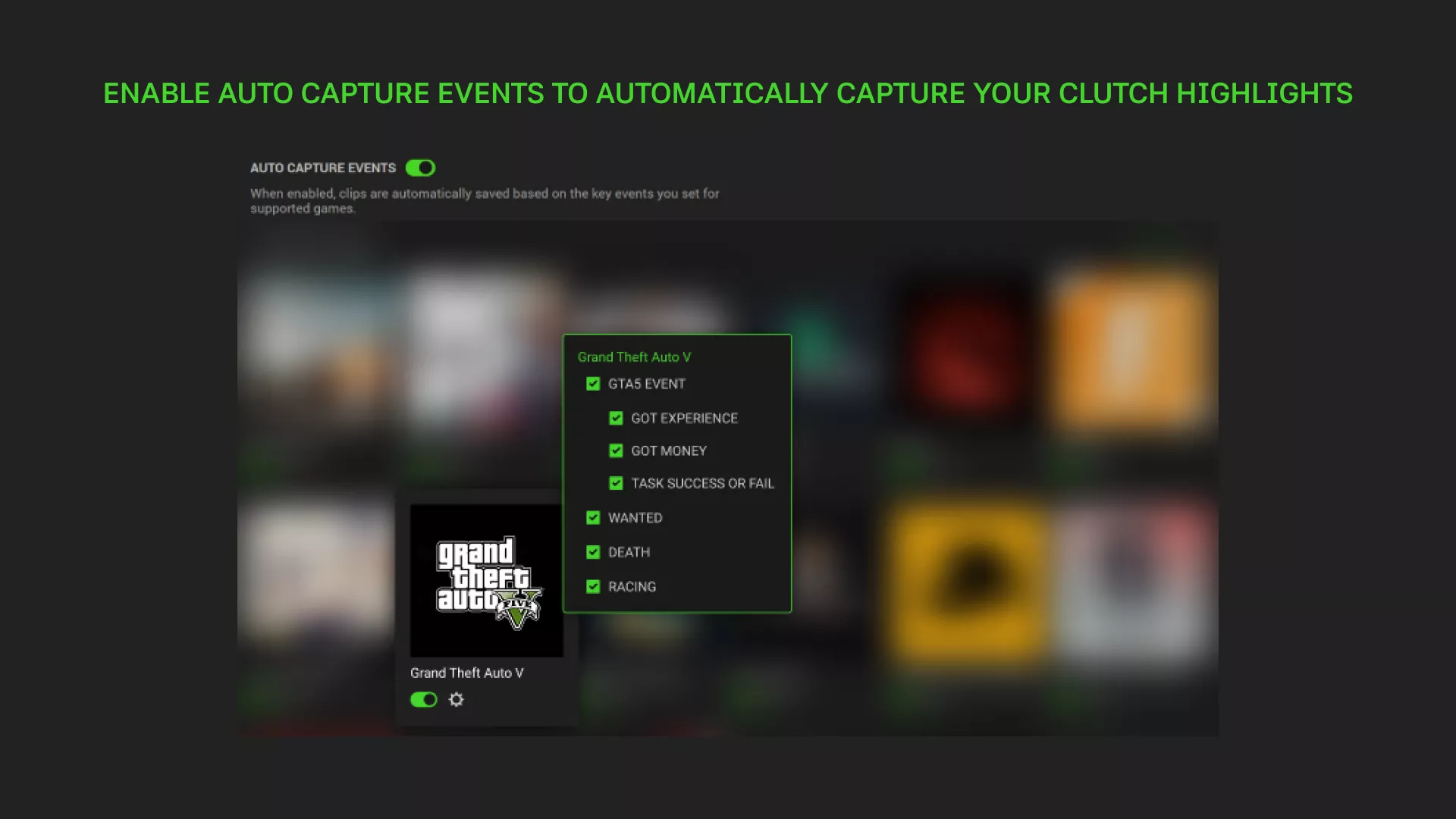
For GTA V, Auto-Clipping can capture supported events such as Mission Success, Mission Failed, Player Death, Wanted Level, Money Earned, and Experience Gained as they happen. Players can choose which supported events they want Auto-Clipping to save, so the library stays focused on the moments they care about most.
Why Auto-Clipping Fits the Rhythm of GTA V
GTA V moves between planned objectives and unscripted chaos. One minute you are following a mission route. The next, you are improvising through traffic, dealing with a wanted level, or watching a mistake turn into the best part of the session.
That rhythm makes manual recording easy to miss. By the time you realize a chase, death, or failed stunt is worth saving, the best moment may already be over.
Wanted Level and Player Death events are likely to create the most shareable clips because they capture the moments GTA V players naturally replay: the chase that escalates, the escape that almost works, or the funny death that needs no explanation. Mission Success and Mission Failed events add clear replay points around structured gameplay, while Money Earned and Experience Gained help mark the payoff and progression that follow a run.
Your Best GTA V Moments, Ready After the Session
Captured moments are saved and organized in the Razer Cortex Game Clips library, ready to revisit once the session is over.
You can look back at the chase that went further than expected, the mission ending that was worth keeping, or the death that was funnier in replay than it was in the moment. When a clip is worth sharing, it is easier to find without searching through a full session recording.
Your Game Clips library can also sync to the cloud at no extra cost, helping you keep your highlights accessible on PC when you need them.
In GTA V, the moments worth saving rarely wait for a recording hotkey. With Auto-Clipping support in Razer Cortex Game Clips, you can stay focused on Los Santos and return to those moments when the session is over.
Download Razer Cortex and start capturing your GTA V highlights automatically.
