



Razer Viper V4 Pro: Ultra-Light, Ultra-Fast Wireless Esports Mouse
Description not needed: The visuals in this video animation only support what is spoken; the visuals do not provide additional information.
RAZER VIPER V4 PRO
FOR THE PRO
THE VIPER V4 PRO FEELS LIKE AN EXTENSION OF MY HAND.

FASTER WIRELESS PLATFORM

LOWER MOTION LATENCY
aim perfectly aligned to deliver the ultimate competitive edge.
LOWER CLICK LATENCY
mechanical side buttons boast 5.0× lower latency, ensuring faster reactions across every crucial
inputs.
#1 TRUSTED SHAPE, NOW EVEN LIGHTER
More Agile Than Ever.

-
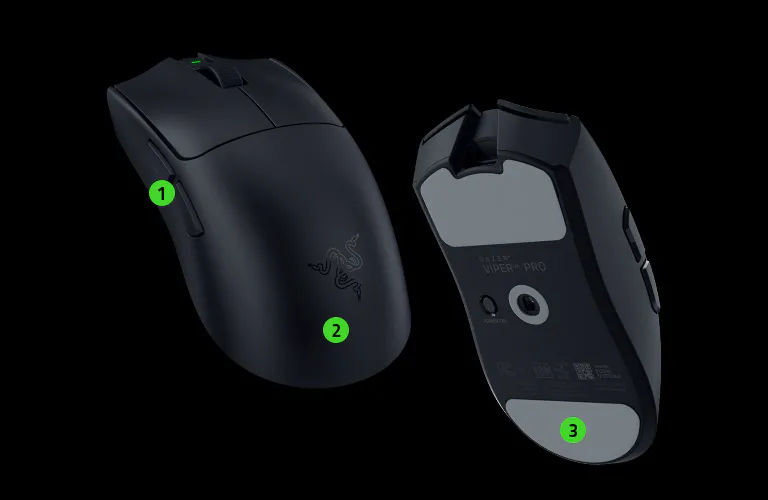
 1
1Separated side buttons to prevent misclicks -
2
Smooth-touch finish that feels soft and smooth, yet remains easy to grip -
3
Large mouse feet for better glide feel
It’s rare for upgrades to be this noticeable. The Viper V4 Pro nails everything.

ALL-OPTICAL SENSOR, SCROLL WHEEL AND SWITCHES
ADVANCED SOFTWARE CUSTOMISATION
Tuned for Peak Precision.
-

DYNAMIC SENSITIVITY
Enable deeper control of your DPI output and mouse input to best suit your playstyle. -
/MC0041-PTFE-Mouse-Feet.svg)
ROTATION TOOL
Adjust mouse orientation for horizontal swipes. -
/MC0032-underside-DPI-button.svg)
1-DPI STEP ADJUSTMENTS
Achieve pixel-perfect sensitivity with single DPI step increments. -
/SW0026-hardware-configurator.svg)
SENSITIVITY MATCHER
Precisely port over the DPI settings of your current mouse to the Viper V4 Pro. -

ASYMMETRIC CUT-OFF
Individually set a lift-off and landing distance from up to 26 levels. -

SMART TRACKING
Auto-calibrate to maintain a consistent lift-off distance on all surfaces.

/MC0041-PTFE-Mouse-Feet.svg)
/MC0032-underside-DPI-button.svg)
/SW0026-hardware-configurator.svg)


RAZER™ OPTICAL MOUSE SWITCHES GEN-4
Top-tier Durability, Tactility, and Speed.

RAZER™ OPTICAL SCROLL WHEEL
3.3× More Reliable Than Mechanical Designs.
HEMISPHERICAL DONGLE REDESIGN
Greater Connectivity and Stability.


MORE FEATURES VALIDATED BY PROS
-
/MC0015-ergonomic-design.svg)
SMOOTH-TOUCH FINISH
Coated with a finish that feels soft and smooth, yet remains easy to grip. -
/MC0007-battery-life.svg)
UP TO 180 HOURS OF BATTERY LIFE Power through your most intense scrimming and tournament schedule. -
/MC0053-customizable-buttons.svg)
6 PROGRAMMABLE CONTROLS
From essential commands to complex macros, enjoy a greater degree of control at your fingertips. -
/MC0016-high-speed.svg)
SMART POLLING RATE SWITCHER Set polling rates for your favorite games and let Razer Synapse automatically adjust your mouse's polling rate based on the title you're playing. -
/SW0067-razer-synapse-4.svg)
RAZER SYNAPSE WEB
Take full control instantly right from your browser. Fine-tune settings and switch on-board profiles wherever you play.
Learn More -
/KB0062-quick-onboard-adjustments.svg)
QUICK ONBOARD ADJUSTMENTS
Change DPI or polling rate on-the-fly for unfair competitive edge in game.
/SW0067-razer-synapse-4.svg)
/KB0062-quick-onboard-adjustments.svg)
UNLOCK THE ULTIMATE PRO COMBO

FAQs
-
What is the form factor of the Razer Viper V4 Pro? The Razer Viper V4 Pro has a right‑handed symmetrical shape optimized for Claw and Fingertip users. Its lightweight, pro‑trusted profile makes it ideal for competitive play where rapid directional control and micro‑adjustments are critical. -
Who is the Razer Viper V4 Pro ideal for? The Viper V4 Pro is built for competitive players who rely on rapid directional control, precise tap-fire timing, and continuous micro-adjustments in fast-paced shooters. Perfect for titles where millisecond-level reactions decide the outcome. -
Does the Razer Viper V4 Pro have onboard memory? Yes. It features one onboard profile that saves your last-used Synapse settings—DPI stages, button mappings, and performance preferences—so you can compete consistently anywhere. -
What does the button at the bottom of the Razer Viper V4 Pro do? The button is programmable on Synapse, but by default, it toggles power (press and hold for 2 seconds to ON/OFF) and DPI (press and release). The factory DPI settings are set at 400, 800, 1600 (default), 3200, and 6400. -
How do I test the Razer Viper V4 Pro’s polling rate? You can test polling rate using our official tool at here. For best results, plug the HyperPolling Wireless Dongle directly into your PC, close background apps, and move the mouse in circular motions during testing. -
How do I optimize my mouse for the best accuracy in gaming? To improve accuracy, consider disabling the "Enhance pointer precision" option in your Windows mouse settings, as this feature can affect mouse sensitivity. Additionally, you can further optimize performance using the Razer Synapse app. Learn more about our enhanced DPI features. -
What do the 3 LED indicators on my Razer HyperSpeed Wireless Gen-2 dongle show? From left to right, they indicate battery life, connection status and polling rate by default. However, you can configure each LED via Synapse to indicate battery level, connection status, polling rate, or DPI stages in any order you prefer, or switch it off.