

Mouse Dock V2 Pro: Gen-2 Wireless Gaming Mouse Dock
RAZER MOUSE DOCK V2 PRO
POWERED. PAIRED. READY.
MAGNETIC WIRELESS CHARGING
Seamless and Convenient
* For optimal performance, use the Razer Wireless Charging Puck V2 included in the box.

RAZER™ HYPERSPEED WIRELESS GEN-2 PLATFORM
True 8000 Hz Wireless Polling Rate

RAZER™ HYPERSPEED MULTI-DEVICE SUPPORT
Dongle-Free Mouse and Keyboard Connectivity

More Features
-
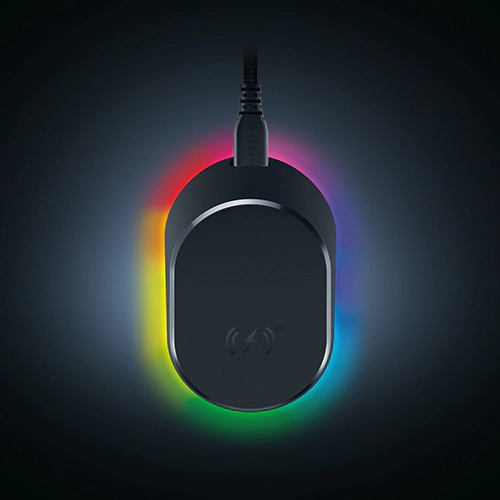
8-ZONE CHROMA LIGHTING WITH FULL UNDERGLOW Customize each lighting zone from 16.8 million colors and countless lighting effects, and experience greater immersion as they react dynamically with hundreds of Chroma-integrated games. Sync compatible Razer Chroma RGB devices and 50+ partner products across your battlestation. -
CHARGE STATUS INDICATOR The mouse and dock light up to reflect battery level, from low (red) to mid (yellow) to full (green). Flashes red when battery is critically low. -
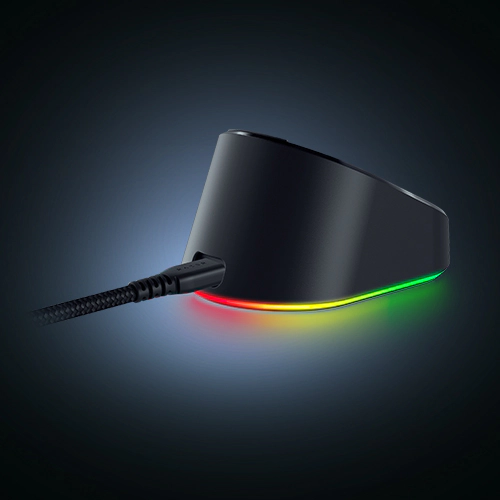
ANTI-SLIP BASE A tacky underside gives the dock incredible grip so it never topples over, yet stays gentle enough to leave no marks on your desk.
How to Install
This is a carousel with highlighted items. Use the Previous and Next buttons to browse through 4 slides.


End of carousel
-
Step 1
Connect the Razer Mouse Dock V2 Pro to a USB Type-A port and select the dock in Razer Synapse 4 -
Step 2
Select ‘Open Pairing Utility’, then ‘Add Compatible Device’, and remove the mouse dongle -
Step 3
Select ‘Pair’ and ensure your mouse is on 2.4 GHz mode

-
Step 1
With the dock already paired to your mouse, open the Pairing Utility in Razer Synapse -
Step 2
Select ‘Add Compatible Device’ and choose your compatible Razer keyboard -
Step 3
Select ‘Pair’ and remove the keyboard’s dongle once the connection is confirmed

Razer Mouse Dock V2 Pro - Frequently Asked Questions
-
Which Razer mice will the Razer Mouse Dock V2 Pro and Razer Wireless Charging Puck V2 work with? They are compatible with the following models: - Razer Basilisk V4 Pro
- Razer Basilisk V4 HyperSpeed
- Razer Basilisk V3 Pro 35K
- Razer Basilisk V3 Pro
- Razer Cobra Pro
- Razer Cobra HyperSpeed
- Razer Naga V3 Pro
- Razer Naga V2 Pro
-
Which Razer keyboard can pair with the Razer Mouse Dock V2 Pro for HyperSpeed Multi-Device Support? They are compatible with the following models: - Razer BlackWidow V4 TKL HyperSpeed
- Razer DeathStalker V2 Pro
- Razer DeathStalker V2 Pro TKL
- Razer BlackWidow V2 Pro
- Razer BlackWidow V3 Mini HyperSpeed
- Razer BlackWidow V3 Mini HyperSpeed Phantom Edition
-
Does the Razer Mouse Dock V2 Pro work with Razer HyperSpeed Wireless Gen-1 mice? Yes. The Razer Mouse Dock V2 Pro supports compatible Razer HyperSpeed Wireless Gen-1 mice, but they operate at Gen-1 latency levels. -
Does the Razer Mouse Dock V2 Pro support multi-device pairing? Yes. The dock’s single transceiver can connect a compatible Razer mouse and keyboard at the same time, freeing up a USB port and removing the need for a separate keyboard dongle. For compatible list of devices, see here. -
Can I use the original Razer Wireless Charging Puck with the Mouse Dock V2 Pro? No. The Mouse Dock V2 Pro is only compatible with the Razer Wireless Charging Puck V2, which is included in the box. For the best charging and wireless performance, use the included Puck V2 rather than the original Wireless Charging Puck. -
Does the Razer Mouse Dock V2 Pro require Razer Synapse? Razer Synapse 4 is required to configure Chroma RGB lighting, pair your mouse and keyboard, and set polling rates. Wireless charging itself works without Synapse installed. -
How does the Razer Mouse Dock V2 Pro show my mouse’s battery level? Its Razer Chroma RGB lighting turns from green to yellow to red as battery drops from high to mid to low. The dock also flashes red when battery is critically low, even while you’re using the mouse. -
Is the Razer Mouse Dock V2 Pro compatible with non-Razer mice? No. The Mouse Dock V2 Pro is designed exclusively for compatible Razer HyperSpeed Wireless mice listed above.