

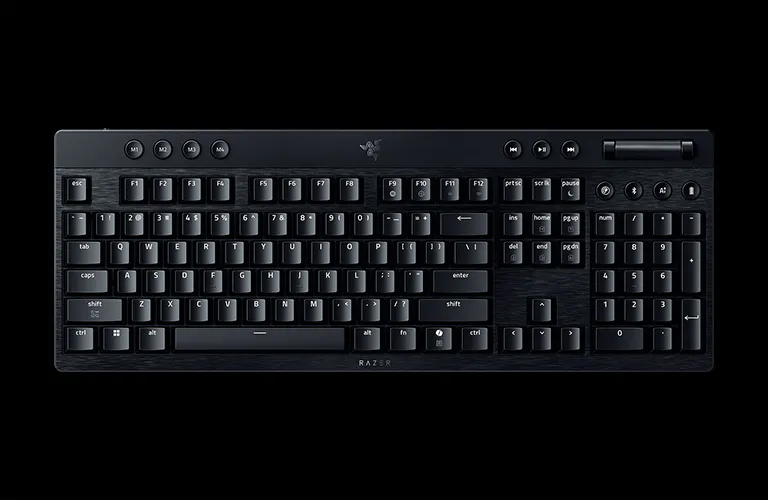
RAZER BLACKWIDOW V4 LOW-PROFILE HYPERSPEED
ULTRA-SLIM. FULLY LOADED.
RAZER™ LOW-PROFILE MECHANICAL SWITCHES
Quick, Precise Actuation

SOUND PROFILES FOR EVERY STYLE
-
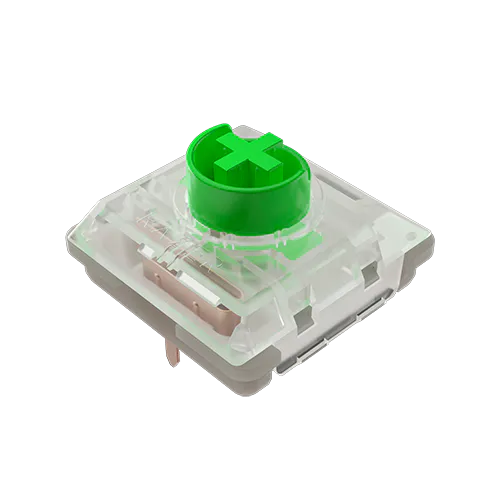
CRISP & CLICKY
Razer Low-profile Green Clicky Mechanical Switch -
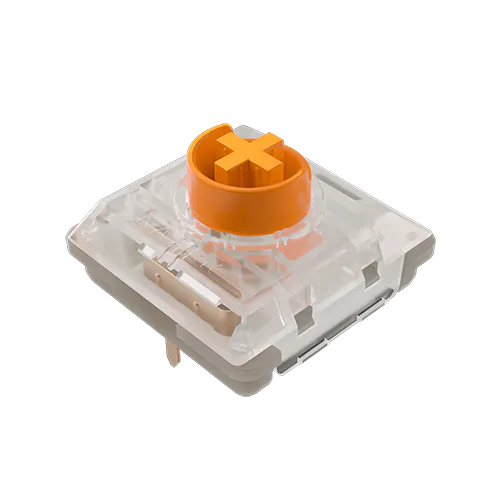
TACTILE & QUIET
Razer Low-profile Orange Tactile Mechanical Switch -
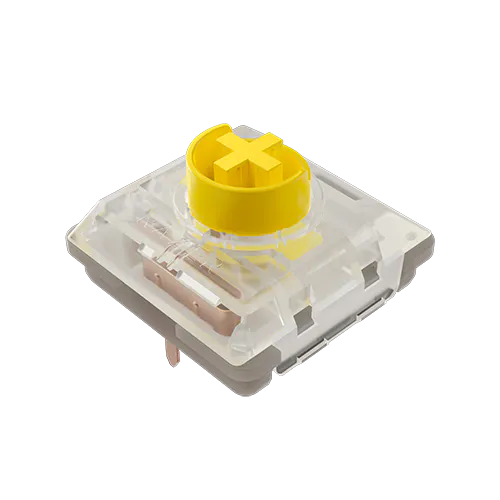
SMOOTH & SILENT
Razer Low-profile Yellow Linear Mechanical Switch -
All typing test sound clips are recorded on a stock Razer BlackWidow V4 Low-profile HyperSpeed with no modifications
RAZER™ HYPERSPEED WIRELESS & BLUETOOTH
Unrivaled Response and Connectivity
Learn More

MULTI-FUNCTION ROLLER & 11 CONTROL BUTTONS
Maximum Efficiency and Convenience


ULTRA-LOW 18.5 MM FRONT HEIGHT & ALUMINUM TOP CASE
Improved Ergonomics and Durability


OPTIMIZED TYPING EXPERIENCE
Enthusiast-Grade Acoustics

-
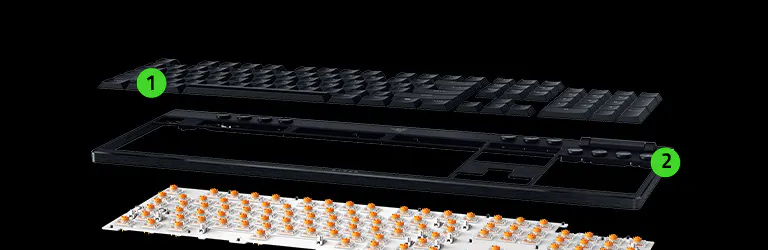 1Doubleshot PBT Keycaps
 -
2Aluminum Top Case
-
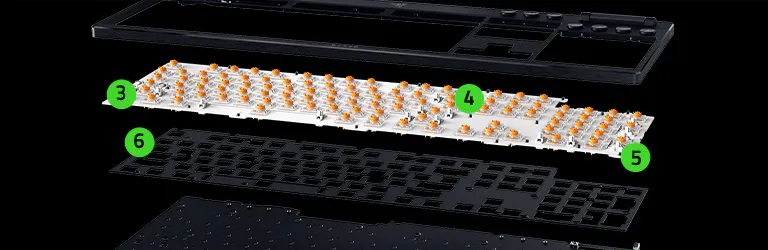 3Razer Low-profile Mechanical Switches
*Available in Green Clicky / Orange Tactile / Yellow Linear -
4Lubricated Stabilizers
-
5Top-mounted Stainless
Steel Plate -
6Plate Foam
-
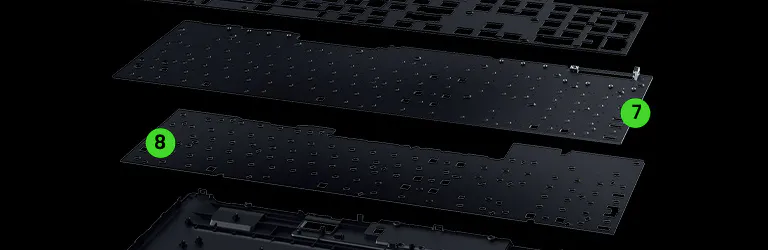 7PCB
7PCB -
8Case Foam
-
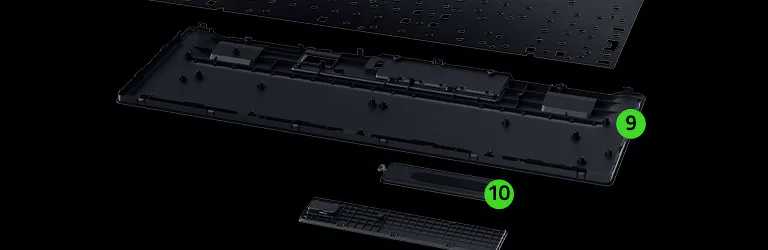 9ABS Bottom Case
 -
10Battery
TEXTURED DOUBLESHOT PBT KEYCAPS
Enhanced Durability and RGB Shine-Through

ULTRA-LONG BATTERY LIFE
Up to 980 Hours

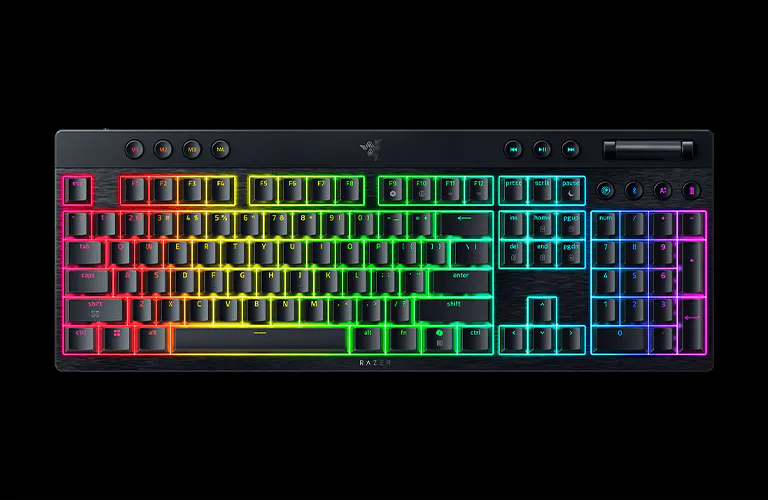

BATTERY LEVEL INDICATOR &
POWER SAVING MODE
POWER SAVING MODE
-
/KB0077-tap.svg)
TAP
View the keyboard’s current battery status via the lighted number row.
-
/KB0076-hold.svg)
HOLD
Toggle Power Saving Mode to maximize battery life.
In Power Saving Mode, the keyboard conserves battery by reducing its polling rate, turning off the keyboard lighting, and pausing Synapse connectivity.
/KB0077-tap.svg)
/KB0076-hold.svg)

RAZER™ HYPERPOLLING WIRELESS
Upgradeable for Ultra-Responsive Performance
RAZER™ SNAP TAP
Advanced Input Priority for Faster Execution

FAQs
-
What is the difference between Razer™ Mechanical Switches and Razer™ Low-profile Mechanical Switches? Razer Mechanical Switches are full-height in nature, offering up to 4.0 mm in total travel distance, whereas Razer Low-profile Mechanical Switches have a shorter total travel distance of up to 2.8 mm. This enables quicker keystrokes, while still delivering a satisfying typing experience. -
Is the Razer BlackWidow V4 Low-profile HyperSpeed a hot-swappable keyboard? No, the keyboard does not feature hot-swap capabilities. However, it is available in 3 distinct low-profile switch options: Green Clicky, Orange Tactile and Yellow Linears. Availability and options will vary depending on layout types and regions. -
How do I check the battery life status on the Razer BlackWidow V4 Low-profile HyperSpeed? Using the dedicated battery life button, the number row will light up and show the estimated percentage accordingly. -
Can I pair the Razer BlackWidow V4 Low-profile HyperSpeed with a compatible Razer wireless mouse to the same USB dongle? Yes, you can easily do this via Razer Synapse, and it is highly recommended to use the USB dongle that came with the keyboard as the main dongle. Please visit our support site for a step-by-step guide to multi-device pairing. -
Can the Razer BlackWidow V4 Low-profile HyperSpeed be used both wired and wirelessly while charging? For wired mode, set the power switch to Wired and plug in the included USB Type A to Type C Cable. This will allow wired use while charging the keyboard. For wireless mode, set the power switch to Wireless and ensure that the HyperSpeed dongle is plugged into the main device. Plug in the included USB Type A to Type C Cable to continue charging the keyboard while using it wirelessly. -
What material is the Razer BlackWidow V4 Low-profile HyperSpeed made of? The top case of this low-profile keyboard is made from durable 5052 aluminum alloy, while the bottom case is constructed using ABS plastic. -
What is a top mount? A top mount is where the switch plate is secured to the top housing of the keyboard directly. This provides a typing experience that’s consistent on any part of the keyboard while also eliminating resonance and ping that’s commonly associated with integrated mounts. -
Is this device compatible with Windows Dynamic Lighting? Please view our list of compatible devices to find out. If your device isn’t listed, we highly recommend turning off Windows Dynamic Lighting to ensure the best Chroma RGB experience. -
Are third-party cables supported with the Razer BlackWidow V4 Low-profile HyperSpeed? As this is a product that requires high-speed USB, it is highly recommended to use the included USB Type A to Type C cable as it is designed to handle high polling rates and high-speed connection. Using other cables that are not USB High-Speed compliant will cause performance issues on the device. -
What is Razer™ Snap Tap and does this keyboard have it? Prioritize the latest input between two selected keys without having to release the previous one. Enjoy more responsive inputs for near-instant directional changes. This keyboard supports Razer Snap Tap onboard and is off by default. -
How do I toggle Razer Snap Tap? Hit FN + Left Shift to immediately toggle Razer Snap Tap. The A and D keys are paired to this mode by default. Paired keys will light up white when Snap Tap is on and light up red when Snap Tap is off. Snap Tap can also be toggled via Razer Synapse, including customizing with your choice of assigned keys. -
How do I ensure I am getting the best experience out of my keyboard? To achieve the best experience with your keyboard, ensure both the firmware and Razer Synapse have been updated to the latest versions. -
Is there a tenkeyless version of the Razer BlackWidow V4 Low-profile HyperSpeed? Yes! If you prefer a more compact layout, check out the Razer BlackWidow V4 Low-profile Tenkeyless HyperSpeed —designed for minimal setups and maximum portability. -
Where can I find Razer BlackWidow V4 Low-profile HyperSpeed gaming keyboard near me? You can purchase it at razer.com or use the store locator to find a retail location near you.